| Pages:
1
2 |
Dave
Posting Freak

Posts: 3281
Registered: 4-6-2003
Location: Halifax
Member Is Offline
Mood: .......
|
|
Internal vs External Hard Drive........
i'm looking to get a new hard drive, which do you think i should get?
i can get
320 gig sata internal drive for $123.88
or
250 gig external for $129.99
the extra space of the 320 would be great but the external could be a good idea as well
any thoughts?
|
|
|
JawnDiablo
Posting Freak
Posts: 12139
Registered: 4-21-2005
Location: 1902666
Member Is Offline
|
|
damn thats alot of space
my internal is 160gb and i dont see myself filling it soon.
i guess the bigger the better
they sell them in terabytes now too.
|
|
|
BDx13
|
|
we're talking PCs, right? does your computer have more than one drive bay so you could add the internal to the one you already have, or if you go
internal would it replace the one you have?
i usually recommend external drives cause it's easy to move them from computer to computer when you upgrade and it allows you to easily expand the
space you have (if an additional internal drive bay isn't available).
disk space is always getting cheaper and you'll always fill up whatever space you have available. buy as much as you can.
in addition to the 80G in my powerbook, i have one 80g external strictly for backup of essential files, then another 250G external, plus i just bought
a network storage drive with 1TB (1,000G) of drive space that's exclusively for music. the network device allows you to upgrade the the discs inside
for a total possible capacity of 3TB. nerdy, but sick!
If I fail math, there goes my chance at a good job and a happy life full of hard work.
|
|
|
BDx13
|
|
i've said it before and i'll say it again...
all disc drives fail eventually. BACK UP YOUR FILES!
If I fail math, there goes my chance at a good job and a happy life full of hard work.
|
|
|
JawnDiablo
Posting Freak
Posts: 12139
Registered: 4-21-2005
Location: 1902666
Member Is Offline
|
|
duane just said it best!
|
|
|
defstarsteve
Posting Freak
Posts: 3505
Registered: 11-19-2003
Member Is Offline
|
|
I have my mini 100 gig external for moving art files between computers
and a 350 external I use for backups and music....
probably get a terabyte in the nea future just for backups for everything in the shop
we mainly use laptops anymore jsut so I an take them anywhere in the shop I need them so I have to go external
|
|
|
BDx13
|
|
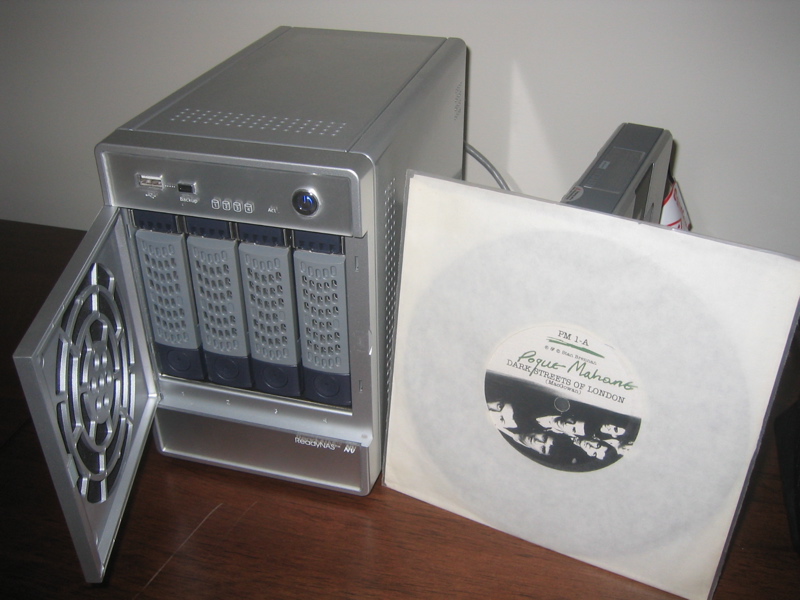
steve, the readyNAS NV is the device i was describing above, and i highly recommend it. it's not cheap, but if you need a large amount space WITH a
built-in backup, you can't beat this thing.
http://www.infrant.com
it's basically a little unix machine with four drive bays that accomodates a max of 3tb, and a minimum of, well, whatever you wanna put in it. the
onboard os determines the best data backup scenario given the number of drives. i started with 2 500g drives, one an exact mirror of the other. once
i added more drives, the device automatically striped the data among all the drives so that is one fails, i still have 100% back up.
i've got mine hooked up to a wireless router, so every laptop in the house can connect to it. plus, it has itunes server built it, so anyone running
itunes on my network has access to the 15,000+ tracks stored on the device.
If I fail math, there goes my chance at a good job and a happy life full of hard work.
|
|
|
BDx13
|
|
oh, it also has UBS drives and acts as a print server.
here's a pic with a 7" for size reference:
If I fail math, there goes my chance at a good job and a happy life full of hard work.
|
|
|
JawnDiablo
Posting Freak
Posts: 12139
Registered: 4-21-2005
Location: 1902666
Member Is Offline
|
|
you dudes are way more computer savy than I.....I am learning though
|
|
|
Jason the Magnificent
Posting Freak
Posts: 3880
Registered: 8-2-2003
Member Is Offline
|
|
Plus the benefit of an external...if someone lives nearby familywise...you can always keep an external at their house....then if somthing happens to
your place or a break in or anything...all the info you took so much effort to save isn't also missing because your extra drive is in/right next to
your pc.
|
|
|
morgan
Posting Freak
Posts: 1815
Registered: 7-21-2006
Location: Seguin, TX
Member Is Offline
Mood: neighbors fighting
|
|
If your need it for gaming you might want an internal hard drive, otherwise ecternal would be fine.
Support the arts, shoot a rapper.
|
|
|
clevohardcore
* Kick\'n ass on the wild side *
Posts: 12937
Registered: 9-19-2004
Member Is Offline
Mood: Sick Of It All, Youth Of Today
|
|
I have no idea what you are talking about but I just read the whole thread and I have to post in it. I mant to know what htis is about but I have no
idea. If computer jobs for were still paying/available I would have went to school for it. Its a shame because I would get into this with education
of course. Around hear there is no employment though for those jobs.
Each aspect of the soul has it's own part to play, but the ideal is harmonious agreement with reason and control.
|
|
|
Six66Mike
Posting Freak
Posts: 3090
Registered: 11-20-2003
Location: Queensland Australia
Member Is Offline
Mood: Dead Hearts
|
|
I just bought a 320GB internal SATA drive, my first SATA.
I got my OS on a 40GB drive.
Mp3's on a 120GB and 160GB
Video & backups will go on the 320GB. Next HDD I buy will be another SATA atleast 500GB if not 1TB, since Hitachi is set to release a 1TB drive soon

A lot of people ask me what kind of music I like. I love "soul music". My "soul music" isn’t a style, genre or niche. It’s music that is genuine. It’s
a painful lyric, a dirty bassline, it’s a harrowing vocal, it’s feedback, it’s an anthem, it’s a love song, it’s anarchy. I’ve got my personal
favourites but in the end it doesn’t matter who or where it comes from... so long as it’s good and it's real.
- Paul Morris, music director at 97.7 HTZ-FM
|
|
|
defstarsteve
Posting Freak
Posts: 3505
Registered: 11-19-2003
Member Is Offline
|
|
big d pm what one of them runs
|
|
|
Dave
Posting Freak
Posts: 3281
Registered: 4-6-2003
Location: Halifax
Member Is Offline
Mood: .......
|
|
i have a 160gig in my pc right now, (which i always have 15 gigs or less free on) and i have the room for another har drive in my case, i'd like the
320gig internal, just for the extra space , but in the near future if i can somehow swing it i'd like to get a laptop, so the external would work
great if that day ever comes around.
still not sure i'll have to think about it some more i guess.
|
|
|
clevohardcore
* Kick\'n ass on the wild side *
Posts: 12937
Registered: 9-19-2004
Member Is Offline
Mood: Sick Of It All, Youth Of Today
|
|
I got a pc with windows. How do I find my memory and what I have left in it? I want to see how much the music I have been ripping to my computer is
taking up.
Each aspect of the soul has it's own part to play, but the ideal is harmonious agreement with reason and control.
|
|
|
Six66Mike
Posting Freak
Posts: 3090
Registered: 11-20-2003
Location: Queensland Australia
Member Is Offline
Mood: Dead Hearts
|
|
Easy way:
Start - Run - Explorer
Go to My Computer and right-click the drive and select Properties.
This should bring up a nice pie chart to show Free & Used space, and should also get a total capacity of the drive.
Or you can go the long way through Admin tools & to your Disk Manager to see each drive 
A lot of people ask me what kind of music I like. I love "soul music". My "soul music" isn’t a style, genre or niche. It’s music that is genuine. It’s
a painful lyric, a dirty bassline, it’s a harrowing vocal, it’s feedback, it’s an anthem, it’s a love song, it’s anarchy. I’ve got my personal
favourites but in the end it doesn’t matter who or where it comes from... so long as it’s good and it's real.
- Paul Morris, music director at 97.7 HTZ-FM
|
|
|
Dave
Posting Freak
Posts: 3281
Registered: 4-6-2003
Location: Halifax
Member Is Offline
Mood: .......
|
|
sounds like you need an external drive ... 
|
|
|
clevohardcore
* Kick\'n ass on the wild side *
Posts: 12937
Registered: 9-19-2004
Member Is Offline
Mood: Sick Of It All, Youth Of Today
|
|
| Quote: | Originally posted by Six66Mike
Easy way:
Start - Run - Explorer
Go to My Computer and right-click the drive and select Properties.
This should bring up a nice pie chart to show Free & Used space, and should also get a total capacity of the drive.
Or you can go the long way through Admin tools & to your Disk Manager to see each drive |
^^^^^^ I went to MY COMPUTER and all I did was move the curser over the C and D icon and it said
C = free space 117 GB and total 144 GB.
D= 627 mb free and 4.13 total GB
Is this good bad or otherwise? Where is the music I am ripping to the computer going? Is it C or D?
Each aspect of the soul has it's own part to play, but the ideal is harmonious agreement with reason and control.
|
|
|
BDx13
|
|
clevo, i'm not so good on PCs, but i'm sure others here can help you. your music is most likely in the 'my music' folder, which i most likely on the
c drive.
dave, you're facing the classic debate of internal vs external. you can get more space for your money with the internal, but you're tied to needing
an extra drive bay and a desktop enclosure. that said... if you buy an internal for your current desktop, then upgrade to a laptop in the relative
near future, you can buy an enclosure for your once-internal drive, making it an external to work with you new laptop. hard drive enclosures run
$25-$50 depending on the manufacturer and the features (usb vs firewire, number of ports, ect).
If I fail math, there goes my chance at a good job and a happy life full of hard work.
|
|
|
BDx13
|
|
steve, there are a number of companies that make NAS drives. after quite a bit of research, Infrant not only best met my needs, but they generally
received the best reviews. I'd say Thecus seemed the next most popular. I had a Buffalo drive once and it sucked hard. Selling points of the
Infrant for me were:
- active online support
- strong mac support (which is rare in this market)
- replaceable/upgradable drives (if a drive fails on a traditional external, you're usually outta luck)
- hot swapable drives
- self-managemed backup (i don't wanna think about RAID 0 vs RAID 5, etc. the operating system on the box makes sure my data is completely
duplicated. if one drive fails, I just slap in a new one, the OS calibrates it and redistributes the backed up data across all four).
When I was doing my research, the total capacity of the ReadyNAS was 2TB (assuming 4x500GB). Within a week of Seagate releasing their 750GB drives,
Infrant had a firmware update avaiable adding support for the new drives and upping the total capacity to 3TB. That's proactive. Buffalo was
literally six months to a year behind in updateing their firmware to make new technologies compatable.
Infrant does not sell their drives directly. You can get them on amazon, but http://www.eaegis.com works directly with Infrant, they test every drive before they send it out, and they'll put together any configuration you
want. You can also buy it diskless and add your own.
If I fail math, there goes my chance at a good job and a happy life full of hard work.
|
|
|
Six66Mike
Posting Freak
Posts: 3090
Registered: 11-20-2003
Location: Queensland Australia
Member Is Offline
Mood: Dead Hearts
|
|
| Quote: | Originally posted by clevohardcore
| Quote: | Originally posted by Six66Mike
Easy way:
Start - Run - Explorer
Go to My Computer and right-click the drive and select Properties.
This should bring up a nice pie chart to show Free & Used space, and should also get a total capacity of the drive.
Or you can go the long way through Admin tools & to your Disk Manager to see each drive |
^^^^^^ I went to MY COMPUTER and all I did was move the curser over the C and D icon and it said
C = free space 117 GB and total 144 GB.
D= 627 mb free and 4.13 total GB
Is this good bad or otherwise? Where is the music I am ripping to the computer going? Is it C or D? |
D: is running out of space but the C: has a ton of space left so you should be good.
Music could be stored anywhere, likely My Music if you haven't set a specific folder to save to. I have mine going to the D: in a folder for new
music then sort & move it to the proper folder/drive
A lot of people ask me what kind of music I like. I love "soul music". My "soul music" isn’t a style, genre or niche. It’s music that is genuine. It’s
a painful lyric, a dirty bassline, it’s a harrowing vocal, it’s feedback, it’s an anthem, it’s a love song, it’s anarchy. I’ve got my personal
favourites but in the end it doesn’t matter who or where it comes from... so long as it’s good and it's real.
- Paul Morris, music director at 97.7 HTZ-FM
|
|
|
Dave
Posting Freak
Posts: 3281
Registered: 4-6-2003
Location: Halifax
Member Is Offline
Mood: .......
|
|
if your not sure where the mp3's are going try this:
start--search--check/pictures music video box, then hit search and it should come up with where all of your files are.
|
|
|
Dave
Posting Freak
Posts: 3281
Registered: 4-6-2003
Location: Halifax
Member Is Offline
Mood: .......
|
|
| Quote: | Originally posted by BD
dave, you're facing the classic debate of internal vs external. you can get more space for your money with the internal, but you're tied to needing
an extra drive bay and a desktop enclosure. that said... if you buy an internal for your current desktop, then upgrade to a laptop in the relative
near future, you can buy an enclosure for your once-internal drive, making it an external to work with you new laptop. hard drive enclosures run
$25-$50 depending on the manufacturer and the features (usb vs firewire, number of ports, ect). |
hmm didnt know about buying enclosures for hard drives, that may make the decision a bit easier now.....
still might wait a bit anyways.....kinda broke right now, poor student symdrome
|
|
|
Dave
Posting Freak
Posts: 3281
Registered: 4-6-2003
Location: Halifax
Member Is Offline
Mood: .......
|
|
okay i found what i want:
320GB External Hard Drive $149.99
now to come up with the $$ and i can have the best of both worlds 
now to track down some cheap DDR2 Ram.........
and a new fan so my cpu won't be so loud.......
|
|
|
| Pages:
1
2 |




![[*]](images/thorp/default_icon.gif)